
Sunbit
SunbitFinance
3.9617.00 Reviews
- Version
- 2.6.37
- Installs
- 500.00K
- Age Rating
- Everyone
Screenshots
Our Review of Sunbit
 Analysis by Appyee
I found Sunbit most useful when I stopped thinking of it as a general finance app and treated it as a focused control panel for an existing Sunbit Card and its payment plans. That distinction matters. It is not the kind of app I would open to compare bank accounts, build a full household budget, or manage every bill in one place. Its job is narrower: help you keep an eye on Sunbit-related payments while you are away from a desktop or paperwork.
In my experience, that narrow purpose can be reassuring in a shared household. One person may handle the card while another remembers the upcoming payment, checks a plan, or needs to discuss whether a purchase fits the household budget. Having the account information available in an app can make that conversation more practical. At the same time, I would not treat a shared phone or family tablet as automatically suitable for private financial details. The convenience works best when the account holder remains clearly in control of access.
How Sunbit fits into everyday household money management
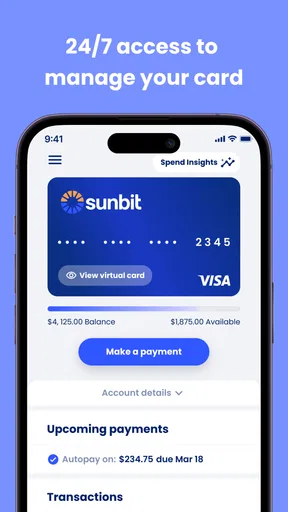
The app comes from Sunbit and belongs to the finance category. It is free to download, and its purpose is straightforward: manage a Sunbit Card and payment plans from a mobile device. I like that the central idea is easy to understand. You are not asked to learn a broad collection of budgeting tools before reaching the information that matters to the service.
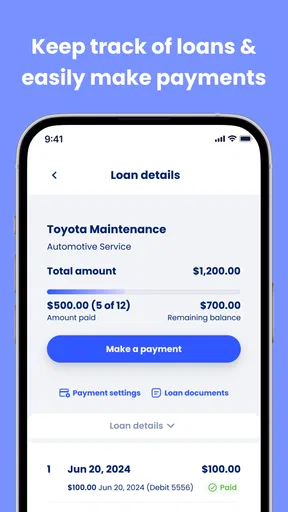
A realistic use case is a household where one adult uses the Sunbit Card for an approved purchase and later wants to review the related payment plan while away from home. Perhaps the person is standing in a shop, sitting in a car before an appointment, or checking finances after receiving a reminder. Instead of searching through email or trying to remember details, the app gives that account holder a dedicated place to review the Sunbit side of the arrangement.
That does not mean every member of the household should use the same account. If two people share a device, I would decide in advance who is allowed to open the app and who is only involved in the conversation around a payment. Financial access and household coordination are not the same thing. A partner may need to know what a payment means without needing unrestricted access to the account itself.
This is one of the app’s less obvious strengths: its limited scope can reduce distraction. A full banking app often mixes balances, transfers, cards, alerts, deposits, and unrelated transactions. Sunbit keeps the attention on its own card and plans. For someone who only wants to check that specific obligation, that can feel cleaner than navigating a complete banking dashboard.
What I would check before handing over a shared device
Before using the app on a household tablet or a phone that other people regularly handle, I would establish a simple boundary: the account holder opens it, reviews the information, and closes it when finished. I would avoid leaving the app visible in the recent-apps screen if the device is used by children, guests, or anyone who should not see financial information.
I would also avoid assuming that a shared device is harmless just because the app is rated for Everyone. The age rating describes the app’s general suitability, not permission for every age group to access an adult’s financial account. A child might be able to use the device safely for ordinary tasks while still not being an appropriate person to view payment details.
For a household, the practical question is not simply, “Can we install it?” It is, “Who needs to see what, and when?” If only one person is responsible for the Sunbit Card, keeping the app on that person’s own phone is the least complicated arrangement. If a shared device is unavoidable, I would make account boundaries part of the household routine rather than relying on everyone to remember them.
I would also keep the app’s role separate from a family budget. Sunbit can help with the Sunbit portion of a purchase, but it should not become the only place where household affordability is judged. Before agreeing to a payment plan, I would compare the expected payments with rent, utilities, groceries, subscriptions, and other card commitments. A convenient view of one plan does not automatically show the full pressure on the household budget.
Using the app to coordinate without exposing everything
Coordination is where I see the most practical value for couples or other adults sharing expenses. One person can open the app and explain what they are seeing, while the other helps decide whether a payment fits the month’s plan. This is more sensible than passing a logged-in phone around casually, especially when the device contains other private information.
A useful routine would be to review the Sunbit information at the same time as the household’s regular money check-in. I would note the payment plan, compare it with the month’s available cash, and then record the household decision somewhere appropriate. The app can be the source for the Sunbit details, but it does not need to become the household’s entire record-keeping system.
That separation prevents a common mistake: confusing visibility with coordination. Seeing a payment does not mean everyone has agreed on who will cover it. If a partner uses the card but another person pays the household bills, I would confirm the arrangement directly rather than assuming the app itself solves the division of responsibility.
There is also a useful distinction between checking a plan and making a new spending decision. The app may help you understand an existing Sunbit obligation, but I would not use the ease of opening a mobile screen as a reason to make a rushed purchase. My preferred workflow is to review the plan, close the app, calculate the wider monthly effect, and only then decide. That small pause is valuable because payment plans can make a large purchase feel less immediate than it really is.
For people who manage several financial products, I would use Sunbit alongside—not instead of—their main bank app. The bank app is usually the better place to understand total cash flow and outgoing payments. Sunbit is more useful as the focused reference for the Sunbit Card and its associated plans. The two tools answer different questions, and pretending one replaces the other can lead to an incomplete picture.
Age, trust, and the right person to use it
Sunbit carries an Everyone content rating, which makes the app broadly approachable from a content perspective. I would still recommend that the actual account use remain with the responsible adult or authorized account holder. A young person could help with a household checklist or remind someone to review a plan, but that is different from giving them access to financial information.
This matters particularly on family devices. A child may borrow a parent’s phone to watch a video or play a game and accidentally open an app left on the screen. Even without changing anything, simply seeing a card or payment detail can create unnecessary confusion. My advice is basic but important: close the app after use, keep the device’s general access private, and do not treat the age rating as a substitute for account judgment.
Trust also matters between adults. If a partner needs to help with household planning, I prefer a transparent conversation over silently sharing login access. The account holder can review the relevant details and discuss the amount, timing, and purpose of the plan. That approach keeps responsibility clear and avoids turning a useful coordination tool into an unclear shared credential.
I would be especially cautious with a device used by several relatives or roommates. A shared household is not always a shared financial account. Roommates may split a purchase or discuss a bill while still having completely separate finances. In that situation, the app should remain with the person whose Sunbit account it represents, and any shared-cost decision should be handled outside the account screen.
What the mobile experience does well
The strongest part of the experience is focus. When I want information about a Sunbit Card or payment plan, a dedicated app is more direct than searching through general banking menus. The store summary presents it as a way to manage those products from anywhere, and that captures the practical appeal: the information travels with you instead of being tied to a desktop routine.
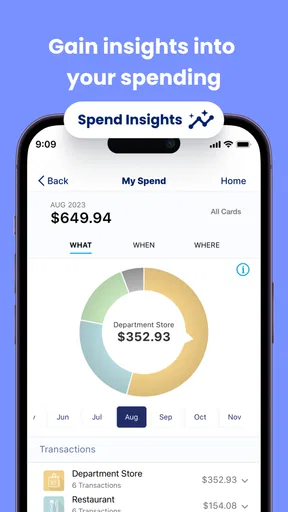
I also appreciate the difference between a payment-plan tool and a conventional spending tracker. A spending tracker helps categorize a broad range of transactions. Sunbit is relevant when the question is more specific: what is happening with this Sunbit Card relationship or plan? That can make it a better companion for a particular purchase, especially when the rest of your finances are already managed elsewhere.
The app has reached over 500 thousand installs and holds an average rating of 3.9 from around 1.4 thousand ratings. I read that as a sign of useful but not universally smooth experiences. It has enough adoption to be familiar to many Sunbit users, while the rating also suggests I should not promise a flawless experience for every device or situation.
Its current version is 2.6.37, and it supports devices running Android 8.0 or later. That makes it accessible to people who are not using the newest phone, although anyone with an older device should check compatibility before making the app part of a time-sensitive payment routine. I would not wait until the moment a payment needs checking to discover that the phone cannot install or update it.
One practical tip is to open the app during a calm moment before you need it urgently. Confirm that you can reach the relevant account information, understand where the payment plan appears, and know how you will discuss it with anyone else involved. This is a small preparation step, but it avoids making a financial decision while also troubleshooting a new mobile workflow.
Where the app is less suitable
The focused design is also its main limitation. If your goal is to manage checking accounts, savings, investments, cash spending, and several credit cards together, this is not the right central tool. A bank app or established personal-finance service will usually provide a broader view. Sunbit makes more sense as a companion for its own products rather than as the household’s financial command center.
I would also skip it as a shared family budgeting solution. It does not turn separate responsibilities into one coordinated plan simply because multiple people can look at the same screen. If your household needs shared categories, spending limits, bill assignment, or a complete monthly overview, you will need another method alongside it.
There is a further trade-off in relying on a mobile app for an important payment. A phone is convenient, but it depends on the device being available, supported, and used by the right person. I would keep ordinary reminders or a household note for important dates rather than assuming that opening one app will be the entire system. The app can support good organization; it cannot replace it.
I would also be careful about using the app to justify a purchase that the household cannot comfortably afford. Payment plans can make expenses easier to organize, but the lower periodic amount is not the same as a lower total household commitment. My own approach would be to treat the app as a visibility tool, then make the affordability decision using the full budget.
My household verdict
After looking at it as both a finance tool and a shared-device consideration, I see Sunbit as a sensible choice for people who already use a Sunbit Card or payment plan and want a direct mobile way to manage that relationship. It is free, focused, and easier to place in a household routine than a pile of scattered messages or paper records.
I would recommend it to the account holder who wants quick access while traveling, to a couple coordinating a particular purchase, or to someone who prefers keeping Sunbit information separate from a broader banking app. The best results come from giving it a defined role: review the Sunbit details there, discuss household responsibility openly, and use another tool for the rest of the budget.
I would not recommend making it a family-wide app or leaving it open on a communal device. The Everyone rating does not change the private nature of financial information, and convenience should not blur account ownership. A clear boundary—one responsible user, careful device habits, and direct communication—makes the experience much safer and more useful.
Overall, Sunbit is most valuable as a focused companion for Sunbit Card and payment-plan management, not as a replacement for a bank app or a complete household budget. Its developer, Sunbit, has kept the purpose easy to grasp, and the broad install base shows that many users find that purpose worthwhile. My recommendation is positive for the right audience: install it if you need to manage Sunbit from your phone, but keep the account private, keep the wider budget visible elsewhere, and make every payment decision with the whole household picture in mind.
Verdict
Strengths of Sunbit
- Fast application process with minimal paperwork required
- Payment plans can make unexpected purchases more manageable
- Available through participating merchants and service providers
- Clear repayment schedule helps users plan monthly expenses
- May help cover urgent auto, dental, or medical costs
Limitations of Sunbit
- Availability depends on the merchant and the type of purchase
- Approval and offered terms vary by individual credit assessment
- Financing may cost more than paying the full amount upfront
- Late or missed payments could negatively affect your finances
- Not all features or merchant options may be available in every region
Similar Picks in This Category
View All
Google Wallet
Google LLC4.3

Airtel: Recharge, Bank & Loans
Airtel4.0

PayPal - Pay, Send, Save
PayPal Mobile4.2

DANA Indonesia Digital Wallet
PT Espay Debit Indonesia Koe4.5

Binance: Buy Bitcoin & Crypto
Binance Inc.4.8

Cash App
Block, Inc.4.7
Frequently Asked Questions
What is Sunbit, and how does it work?
Sunbit is a buy-now, pay-over-time service that allows eligible customers to split the cost of purchases into scheduled installments. It is commonly offered through participating retailers and service providers, including automotive, dental, optical, and other businesses. You typically begin an application by scanning a code or selecting Sunbit at checkout, provide the requested information, and receive a decision before accepting the available payment plan.
Is Sunbit available to everyone, and what information is required to apply?
Sunbit approval is not guaranteed, and availability depends on factors such as your location, the participating merchant, the purchase amount, and the information provided during the application. Applicants may need to submit personal details, contact information, and financial or identification data for an eligibility review. Requirements can vary, so it is important to read the on-screen disclosures carefully before completing the application.
Does using Sunbit affect my credit score?
Sunbit may use different types of credit checks depending on the application and transaction, so the effect on your credit profile can vary. In many cases, checking eligibility may not have the same impact as applying for traditional credit, but users should not assume that every inquiry or account activity is consequence-free. Review Sunbit’s current privacy, credit-reporting, and loan or payment-plan disclosures before accepting an offer.
Are there fees or interest charges when paying with Sunbit?
The total cost of a Sunbit purchase depends on the specific offer, merchant, repayment period, and your approved terms. Some plans may include interest or other applicable charges, while the exact terms are normally shown before you finalize the transaction. Carefully compare the amount financed, installment amount, number of payments, annual percentage rate when provided, and total repayment amount rather than focusing only on the monthly payment.
Can I manage payments, make early payments, or get help through the Sunbit app?
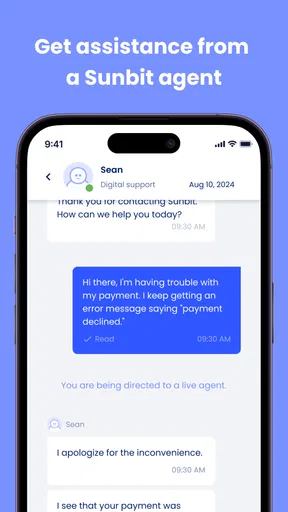
The Sunbit experience may allow customers to review account details, see upcoming payments, manage payment methods, and access support, although available features can depend on the product and region. Before downloading or relying on the app, confirm that it supports your specific purchase agreement. Keep payment information current, monitor scheduled withdrawals, and contact Sunbit support promptly if you need to update details or resolve a billing issue.
